How would you design a resource allocation app?
I built this system for a real problem: an ISP needed to connect new 10Gbps internet customers to the nearest available infrastructure chamber. The sales ...
24 Mar 2024
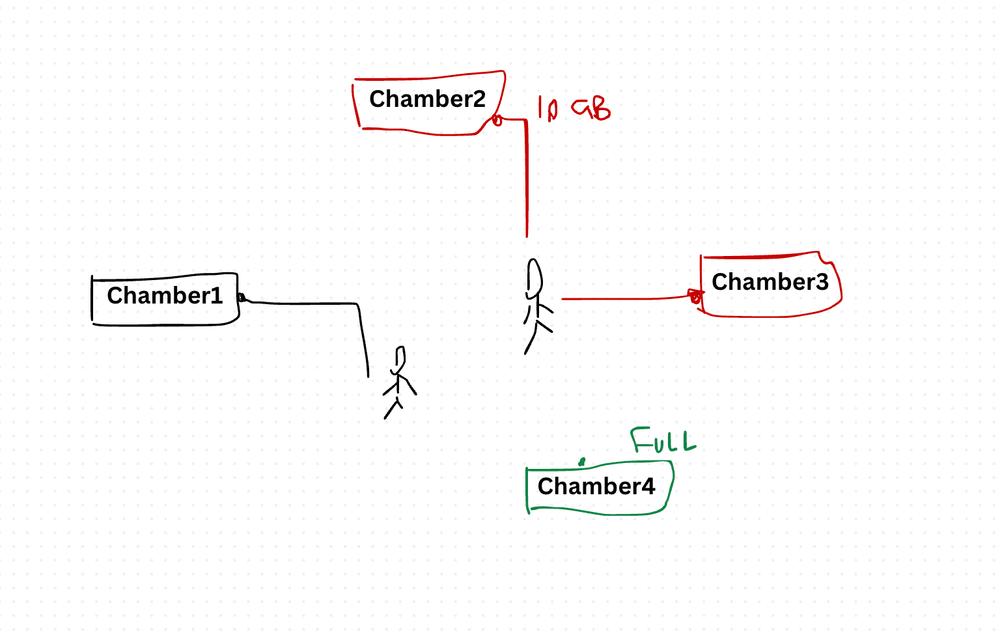
I built this system for a real problem: an ISP needed to connect new 10Gbps internet customers to the nearest available infrastructure chamber. The sales team needed to enter customer details, find the closest chamber with capacity, and get alerts when capacity was running low.
It sounds like a simple lookup. It's actually a geospatial resource allocation problem with capacity constraints. And I used CQRS to keep it clean.
The Problem
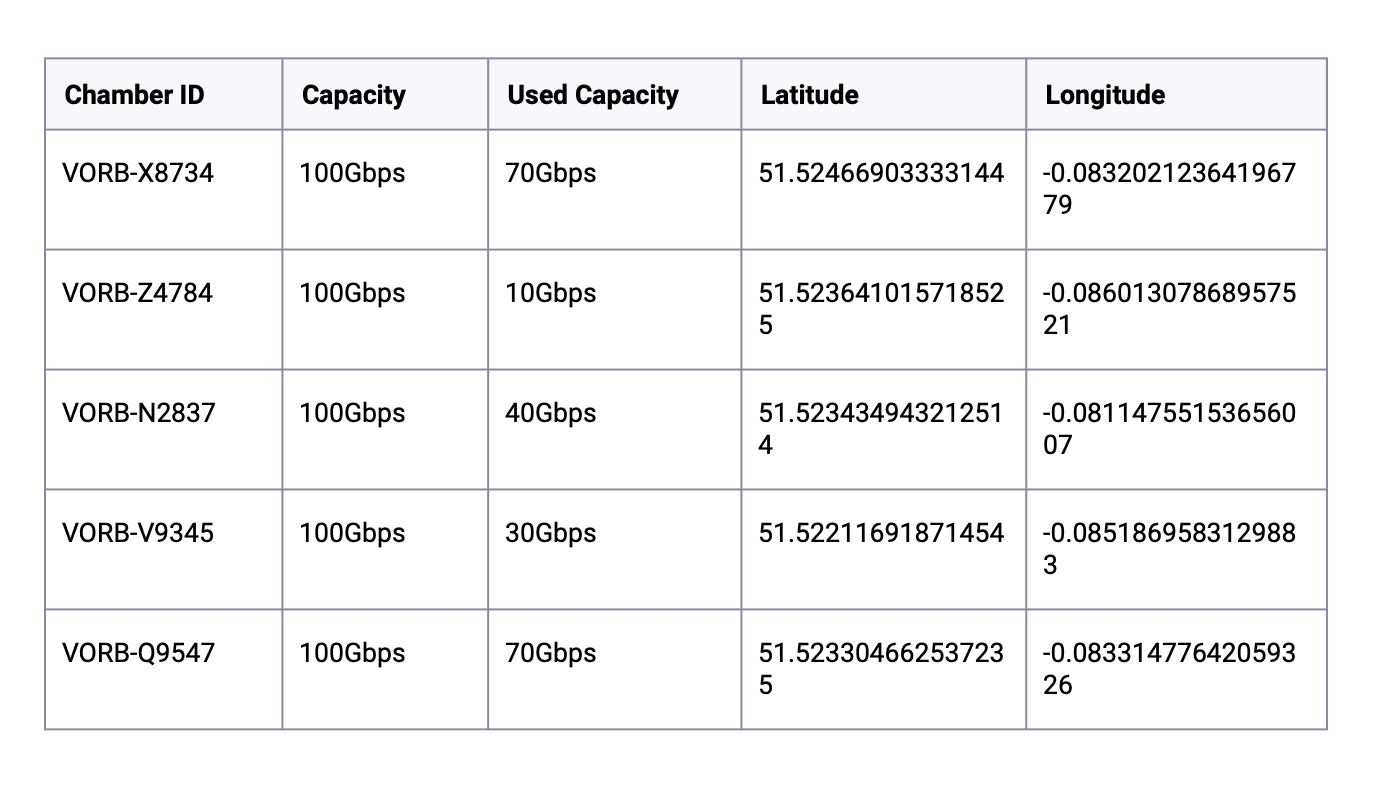
A sales team member enters details about a new customer ordering a 10Gbps internet product. The system needs to:
- Persist the new customer's details.
- Find the closest chamber with available capacity and return its ID.
- Alert the user if the nearest chamber is full — but still show the next closest one that has capacity.
- Alert the user if the chamber they're assigned to is now at capacity (meaning the next customer will need a different one).
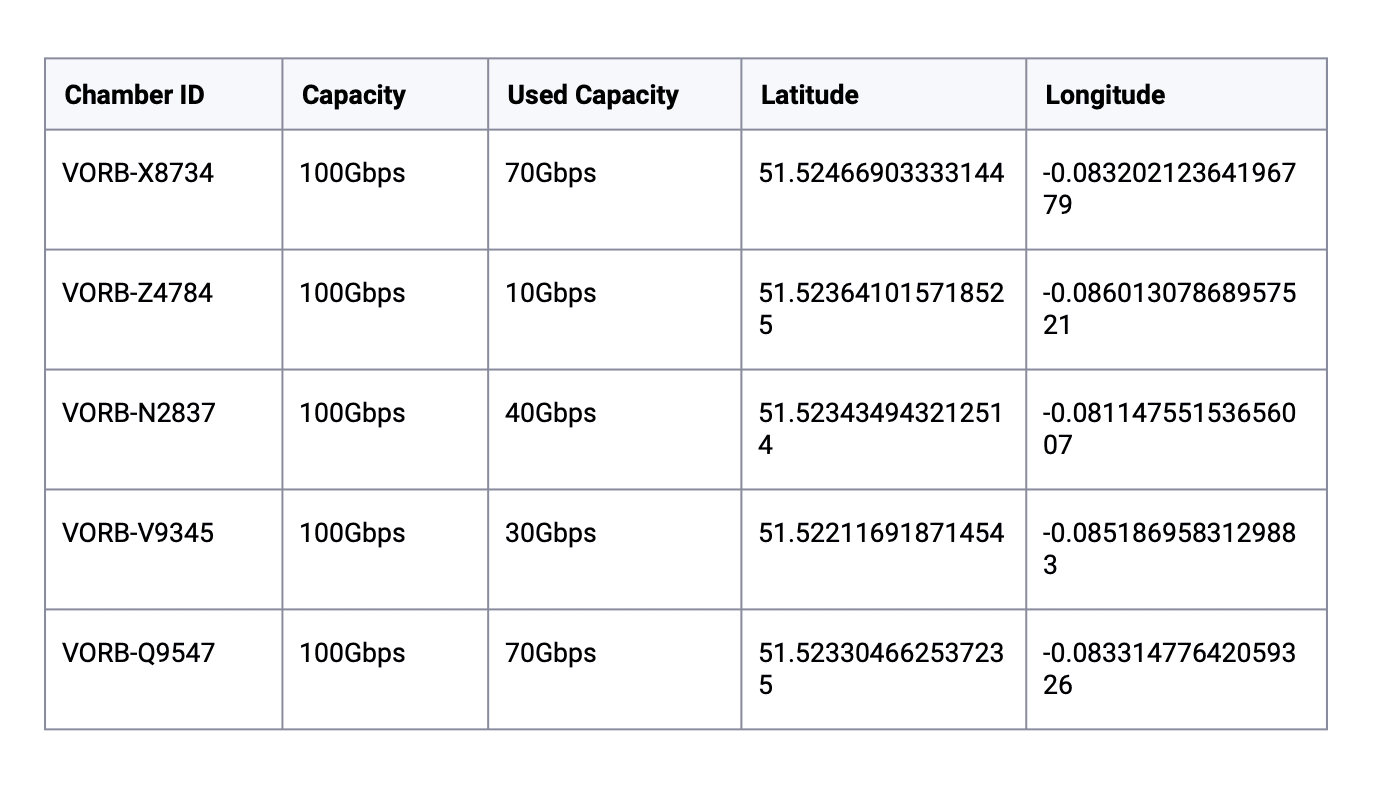
High-Level Architecture
I used CQRS (Command Query Responsibility Segregation) because the read and write patterns are fundamentally different. Writes are infrequent (new customer orders). Reads are frequent and complex (geospatial queries, capacity checks, dashboard views).
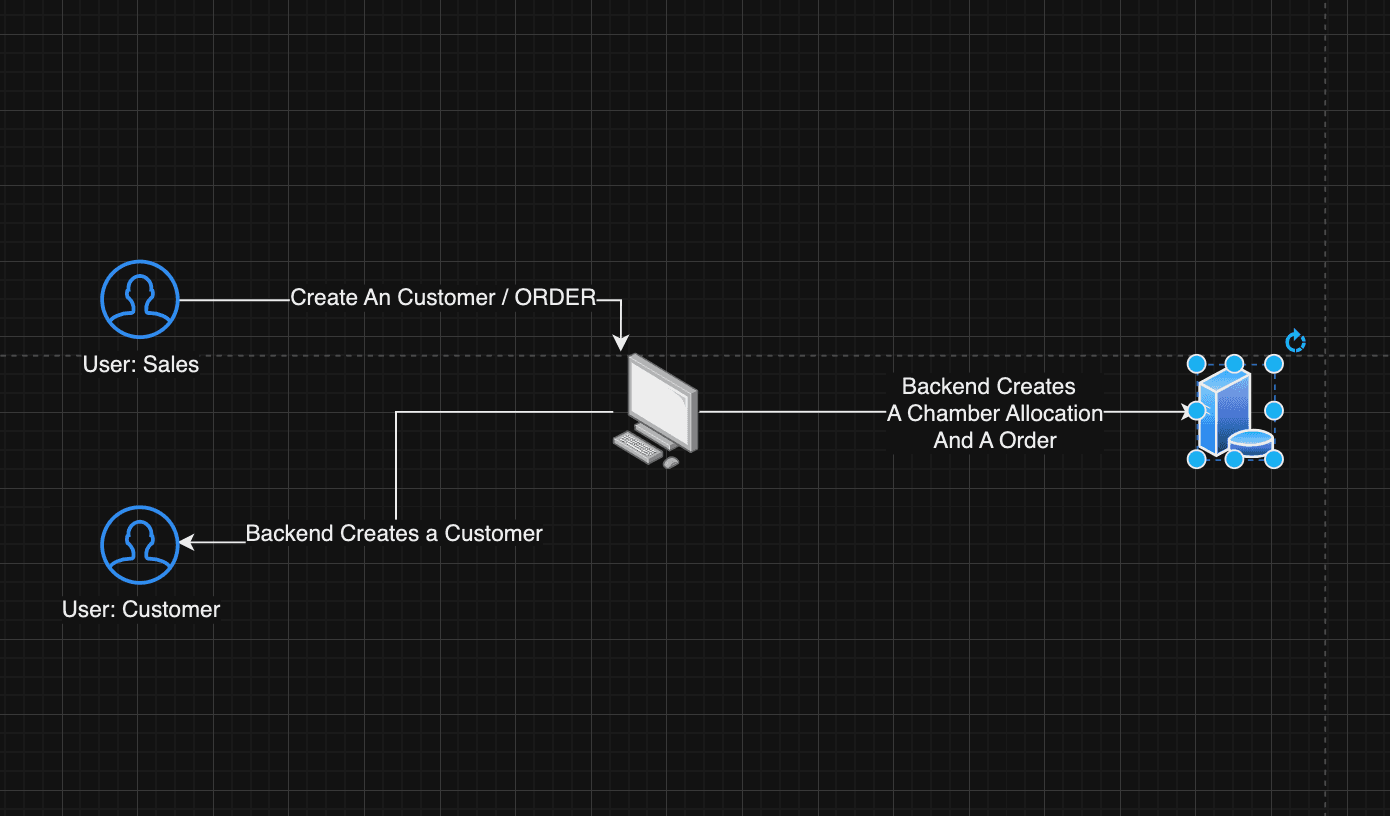
API Design
The API breaks down by domain:
- Auth — Login, Register, Forgot Password, Reset Password, Resend Verification
- Package — List available packages
- Chamber — Get available chambers per package (geospatial query with capacity filter)
- Order — Create, Get All By User, Change, Get Orders By User
- User — Get Profile, Get All Customers Created By Me, Create
Two roles: sales and customer. Sales users create orders on behalf of customers.
UI Layout and User Flow
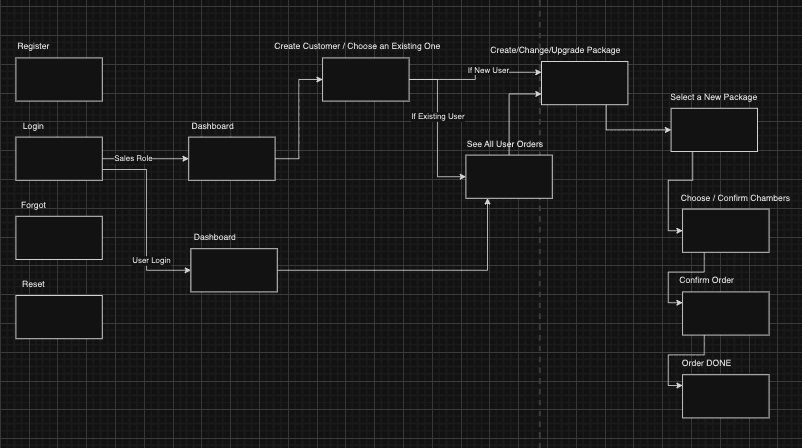
The flow is intentionally simple. The sales team doesn't want complexity — they want to enter a customer's location, see the nearest available chamber, and confirm the order.
Key Implementation Details
Seeding Geospatial Data with Prisma
The chambers have lat/lng coordinates and PostGIS geometry columns for efficient spatial queries:
await prisma.$executeRaw`
    INSERT INTO "Chamber" (id, latitude, longitude, total_capacity, used_capacity, geom)
    VALUES
    (
        'VORB-X8734',
        51.52466903333144,
        -0.08320212364196779,
        100,
        70,
        ST_SetSRID(ST_MakePoint(-0.08320212364196779, 51.52466903333144), 4326)
    ),
    (
        'VORB-Z4784',
        51.523641015718525,
        -0.08601307868957521,
        100,
        10,
        ST_SetSRID(ST_MakePoint(-0.08601307868957521, 51.523641015718525), 4326)
    ),
    (
        'VORB-N2837',
        51.523434943212514,
        -0.08114755153656007,
        100,
        40,
        ST_SetSRID(ST_MakePoint(-0.08114755153656007, 51.523434943212514), 4326)
    ),
    (
        'VORB-V9345',
        51.52211691871454,
        -0.0851869583129883,
        100,
        30,
        ST_SetSRID(ST_MakePoint(-0.0851869583129883, 51.52211691871454), 4326)
    ),
    (
        'VORB-Q9547',
        51.523304662537235,
        -0.08331477642059326,
        100,
        70,
        ST_SetSRID(ST_MakePoint(-0.08331477642059326, 51.523304662537235), 4326)
    );
`;
Querying the Closest Chamber
PostgreSQL with PostGIS handles geospatial distance queries natively. This is the core query — find the closest chamber to a given coordinate:
const chambers = await pg.query( `
    SELECT * FROM "Chamber"
    ${ids?.length ? `WHERE id IN (${ids.join(",")})` : ""}
    ORDER BY ST_Distance(
      geom,
      ST_SetSRID(ST_MakePoint($1, $2), 4326)
    )
    LIMIT $3;
  `,
    [longitude, latitude, limit || 1]
  );
ST_Distance calculates the distance between the customer's location and each chamber. ORDER BY sorts by nearest. LIMIT returns the top N results. Simple, fast, and handled entirely by the database.
Backend Dockerfile
FROM node:lts-iron as build
RUN apt-get update -y
RUN apt-get install -y openssl
RUN apt-get install -y apt-utils

ARG DATABASE_URL=""
ARG NODE_ENV=production
ARG PORT=8000
ARG JWT_SECRET=""

ENV NODE_ENV=$NODE_ENV
ENV PORT=$PORT
ENV DATABASE_URL=$DATABASE_URL
ENV JWT_SECRET=$JWT_SECRET

WORKDIR /app
COPY package*.json ./
RUN npm install
RUN npm install --only=dev

COPY . .
RUN npx prisma generate

EXPOSE 8000
CMD ["npm", "start"]
Database with Docker Compose
PostGIS extends PostgreSQL with geospatial types and functions:
version: "3.8"
services:
  db:
    image: postgis/postgis
    environment:
      POSTGRES_DB: postgres
      POSTGRES_USER: postgres
      POSTGRES_PASSWORD: postgres
    ports:
      - "5432:5432"
    restart: unless-stopped
Frontend with Remix and Tailwind
FROM node:lts-iron as build
RUN apt-get update -y
RUN apt-get install -y openssl
RUN apt-get install -y apt-utils

ARG NODE_ENV=production
ARG PORT=3000
ARG REACT_APP_API_URL=http://localhost:8000

WORKDIR /app
ENV NODE_ENV=development
COPY package*.json ./
RUN npm install

COPY . .
RUN npm run build
ENV NODE_ENV=production
ENV PORT=$PORT
ENV REACT_APP_API_URL=$REACT_APP_API_URL

EXPOSE 3000
CMD ["npm", "start"]
Full Stack Docker Compose
One command to run everything:
version: '3.8'
services:
  database:
    container_name: app-database
    image: postgis/postgis
    environment:
      POSTGRES_USER: postgres
      POSTGRES_PASSWORD: postgres
      POSTGRES_DB: postgres
    restart: unless-stopped
    volumes:
      - database-data:/var/lib/postgresql/data

  backend:
    container_name: app-backend
    build:
      context: ./backend
      dockerfile: Dockerfile
      args:
        NODE_ENV: development
        DATABASE_URL: postgres://postgres:postgres@database:5432/mydb?schema=public&connect_timeout=300
        JWT_SECRET: randomsecret
        PORT: 8000
    ports:
      - "8000:8000"
    depends_on:
      - database
    links:
      - database
    restart: unless-stopped

  frontend:
    container_name: app-frontend
    build:
      context: ./frontend
      dockerfile: Dockerfile
      args:
        NODE_ENV: production
        PORT: 3000
        REACT_APP_API_URL: http://backend:8000
    depends_on:
      - backend
    links:
      - backend
    ports:
      - "3000:3000"
    restart: unless-stopped
volumes:
  database-data:
The Trade-Offs
PostGIS vs. application-level distance calculation. PostGIS handles geospatial math in the database, which is fast and correct (it accounts for Earth's curvature). Calculating distances in application code is error-prone and doesn't scale — you'd need to load all chambers into memory. PostGIS is the right tool here.
CQRS vs. simple CRUD. CQRS adds complexity — separate read and write models, eventual consistency concerns. But for this system, reads (geospatial queries with capacity filters) and writes (new customer orders) have fundamentally different optimization needs. CQRS made the read path fast without complicating the write path.
Capacity management: optimistic vs. pessimistic locking. Two sales reps assigning the last capacity slot simultaneously is a real race condition. I used pessimistic locking (database-level locks on capacity updates) because the cost of over-allocation is high — it means promising a customer service you can't deliver.
AI Transformation for Organisational Leaders
For directors, heads of function and founders: eight live evening sessions with Ehsan Gazar and Anoosh Zeighami, ending with a one-page 2027 AI plan for your organisation, built on a real workflow and ready for your leadership team.
$1,495, or $1,045 with code EARLYBIRD until 23 Oct.
View the live cohortKeep reading
- When Your Data Is Really a Graph: Write the Recursive Query First
- Everything Is Being Rewritten in Rust. Is It Time You Learned It?
- The Capacity Estimation Numbers Every Engineer Should Carry Into a System Design
- Notes From My First Cohort: System Design Is Trade-offs, Not Answers
- Write HLDs and ADRs in HTML or React, Not Markdown
- CRDTs: Conflict-Free Merging in Distributed Systems