Digit Recogniser Machine Learning Tensorflow Javascript And React
I wanted to build a digit recognizer that runs entirely in the browser. No server-side ML. No Python. Just TensorFlow.js and React.
14 Oct 2023

I wanted to build a digit recognizer that runs entirely in the browser. No server-side ML. No Python. Just TensorFlow.js and React.
Github: https://github.com/ehsangazar/digit-recogniser-machine-learning-tensorflow-javascript
Demo: https://ehsangazar.github.io/digit-recogniser-machine-learning-tensorflow-javascript/
The Core Concepts
Neural networks are systems of interconnected nodes — loosely inspired by biological neurons. You define layers, feed in training data, and the network learns to recognize patterns.
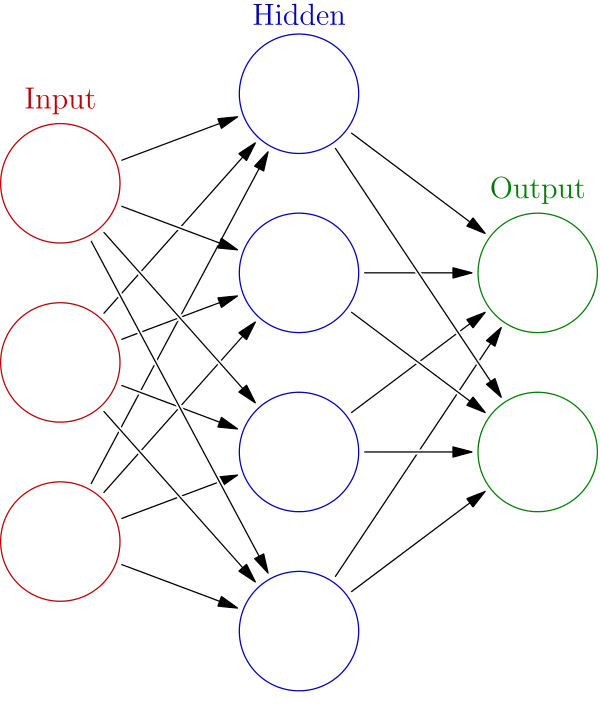
The idea is straightforward: input data goes through hidden layers that transform it, and the output layer produces a prediction. Each layer extracts increasingly abstract features from the input.
You can experiment with this visually using the TensorFlow Playground.
Why CNN?
For image recognition, you want a Convolutional Neural Network (CNN). CNNs are designed specifically for visual data. Each convolutional layer applies filters that detect features — edges, curves, shapes — and passes those features to the next layer.
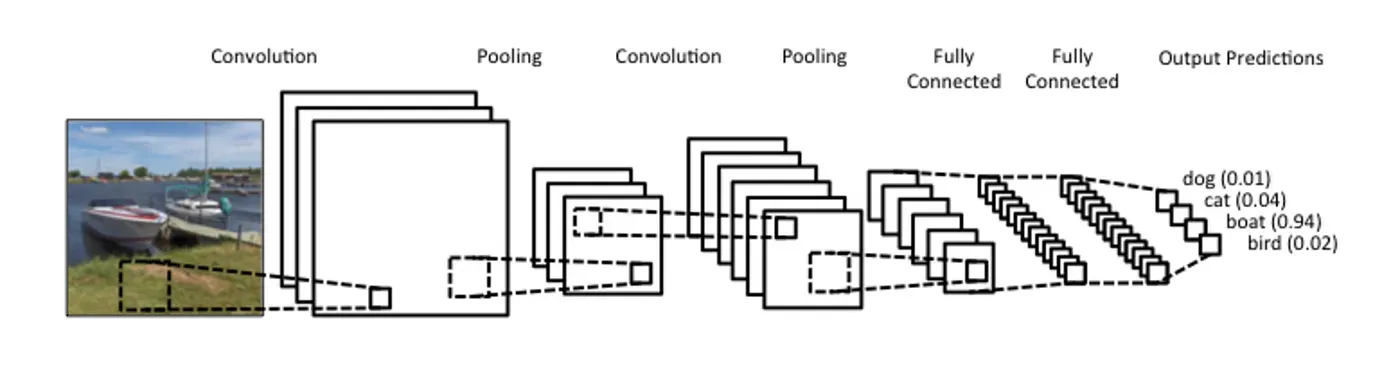
A standard neural network treats every pixel as an independent input. A CNN understands spatial relationships — it knows that adjacent pixels matter. That's what makes it effective for recognizing handwritten digits.
Building It
Start with TensorFlow.js:
npm install @tensorflow/tfjsImport and set up:
import * as tf from '@tensorflow/tfjs'From here, you define a sequential model with convolutional layers, pooling layers, and dense layers. Train it on the MNIST dataset (70,000 handwritten digit images), and you get a model that can classify digits 0–9.
The model runs entirely client-side. The user draws a digit on a canvas element, the drawing gets resized to 28x28 pixels (MNIST's format), and TensorFlow.js runs inference right in the browser.
The Trade-offs
Benefits: No server cost for inference. Low latency — predictions happen instantly. The entire project is a static site you can host on GitHub Pages.
Costs: Training in the browser is slow compared to Python/GPU setups. The model accuracy on a canvas (where people draw with a mouse) is lower than on clean MNIST data. TensorFlow.js bundles are large — you're shipping a ML runtime to the client.
What I Learned
ML in the browser is viable for small models and demos. For production ML, you'd train on a server and deploy the model for client-side inference only. But as a learning exercise, building the entire pipeline in JavaScript gave me a much deeper understanding of how neural networks work than any tutorial did.
AI Transformation for Organisational Leaders
For directors, heads of function and founders: eight live evening sessions with Ehsan Gazar and Anoosh Zeighami, ending with a one-page 2027 AI plan for your organisation, built on a real workflow and ready for your leadership team.
$1,495, or $1,045 with code EARLYBIRD until 23 Oct.
View the live cohortKeep reading
- React 19 Performance Secrets, Concurrent Rendering, Suspense & Real Tips
- Lazy Loading in HTML and CSS: Enhancing Performance and User Experience
- Edge Rendering with Next.js and Cloudflare Workers
- Rolling Out an Internal UI Component Library
- What is a Design System According to Atlassian?
- CSS Houdini: New Possibilities for Your CSS