Functional Patterns: HOFs, Debounce, Throttle, Memoization
In a technical screen at a mid-sized fintech company, I was asked to implement debounce in TypeScript with proper generics. I had used Lodash for years and never thought about how it worked. I fumbled through an answer that did not compile. The interviewer moved on. This lesson makes sure that never happens to you.
Higher-Order Functions
A higher-order function is any function that takes a function as an argument, returns a function, or does both. map, filter, and reduce are the canonical examples. Knowing how to implement them from scratch shows that you understand both functions as values and iteration.
Implementing map
function myMap<T, U>(arr: T[], fn: (item: T, index: number, arr: T[]) => U): U[] {
  const result: U[] = [];
  for (let i = 0; i < arr.length; i++) {
    result.push(fn(arr[i], i, arr));
  }
  return result;
}

const doubled = myMap([1, 2, 3], (n) => n * 2);
console.log(doubled); // [2, 4, 6]

const lengths = myMap(["hello", "world"], (s) => s.length);
console.log(lengths); // [5, 5]
The generic signature <T, U> is important. T is the input element type, U is the output element type. TypeScript infers both from the callback you provide.
Implementing filter
function myFilter<T>(arr: T[], predicate: (item: T, index: number, arr: T[]) => boolean): T[] {
  const result: T[] = [];
  for (let i = 0; i < arr.length; i++) {
    if (predicate(arr[i], i, arr)) {
      result.push(arr[i]);
    }
  }
  return result;
}

const evens = myFilter([1, 2, 3, 4, 5], (n) => n % 2 === 0);
console.log(evens); // [2, 4]
Implementing reduce
reduce is the most powerful and the most misunderstood. It collapses an array into a single value by accumulating state across iterations.
function myReduce<T, U>(
  arr: T[],
  fn: (accumulator: U, current: T, index: number, arr: T[]) => U,
  initialValue: U
): U {
  let acc = initialValue;
  for (let i = 0; i < arr.length; i++) {
    acc = fn(acc, arr[i], i, arr);
  }
  return acc;
}

const sum = myReduce([1, 2, 3, 4], (acc, n) => acc + n, 0);
console.log(sum); // 10

const grouped = myReduce(
  ["apple", "banana", "avocado", "blueberry"],
  (acc, word) => {
    const key = word[0];
    acc[key] = [...(acc[key] ?? []), word];
    return acc;
  },
  {} as Record<string, string[]>
);
console.log(grouped); // { a: ['apple', 'avocado'], b: ['banana', 'blueberry'] }
Function Composition and Pipe
Composition chains functions together so the output of one becomes the input of the next. There are two directions: compose (right to left) and pipe (left to right). In most modern codebases, pipe is preferred because it reads in execution order.
type UnaryFn<T, U> = (arg: T) => U;

// pipe: left to right: first fn runs first
function pipe<A, B, C>(f: UnaryFn<A, B>, g: UnaryFn<B, C>): UnaryFn<A, C>;
function pipe<A, B, C, D>(
  f: UnaryFn<A, B>,
  g: UnaryFn<B, C>,
  h: UnaryFn<C, D>
): UnaryFn<A, D>;
function pipe(...fns: Array<UnaryFn<unknown, unknown>>): UnaryFn<unknown, unknown> {
  return (input: unknown) => fns.reduce((acc, fn) => fn(acc), input);
}

// compose: right to left: last fn runs first
function compose<A, B, C>(f: UnaryFn<B, C>, g: UnaryFn<A, B>): UnaryFn<A, C> {
  return (input: A) => f(g(input));
}

// Usage
const trim = (s: string): string => s.trim();
const toLower = (s: string): string => s.toLowerCase();
const addPrefix = (s: string): string => `user_${s}`;

const normaliseUsername = pipe(trim, toLower, addPrefix);

console.log(normaliseUsername("  Alice  ")); // user_alice
Typed overloads for pipe are verbose, but they give you type safety at each step. The runtime implementation is a simple reduce.
Currying and Partial Application
Currying transforms a function that takes multiple arguments into a chain of functions that each take one argument. Partial application is fixing some arguments upfront and returning a function that takes the rest.
// Curried add
function curriedAdd(a: number): (b: number) => (c: number) => number {
  return (b) => (c) => a + b + c;
}

console.log(curriedAdd(1)(2)(3)); // 6

const add10 = curriedAdd(10); // Partially applied: a is fixed
console.log(add10(5)(3)); // 18

// Generic curry for 2-argument functions
function curry2<A, B, C>(fn: (a: A, b: B) => C): (a: A) => (b: B) => C {
  return (a) => (b) => fn(a, b);
}

const multiply = (x: number, y: number): number => x * y;
const double = curry2(multiply)(2);
const triple = curry2(multiply)(3);

console.log(double(5)); // 10
console.log(triple(5)); // 15
Currying shows up in functional pipelines where you need to specialise a general function for a specific use case without immediately providing all arguments.
Memoization: Generic Implementation
Memoization caches the result of a function call keyed by its arguments. Subsequent calls with the same arguments skip the computation and return the cached result.
function memo<TArgs extends unknown[], TReturn>(
  fn: (...args: TArgs) => TReturn,
  keyFn: (...args: TArgs) => string = (...args) => JSON.stringify(args)
): (...args: TArgs) => TReturn {
  const cache = new Map<string, TReturn>();

  return function (...args: TArgs): TReturn {
    const key = keyFn(...args);

    if (cache.has(key)) {
      return cache.get(key) as TReturn;
    }

    const result = fn(...args);
    cache.set(key, result);
    return result;
  };
}

// Usage: expensive Fibonacci without memoization is O(2^n)
function fib(n: number): number {
  if (n <= 1) return n;
  return fib(n - 1) + fib(n - 2);
}

const memoFib = memo(fib);
console.log(memoFib(40)); // Fast
console.log(memoFib(40)); // Instant: cache hit
The keyFn parameter lets you customise how arguments are serialised. JSON.stringify works for most cases but fails for non-serialisable arguments (functions, circular references). Providing a custom keyFn handles those edge cases.
Debounce
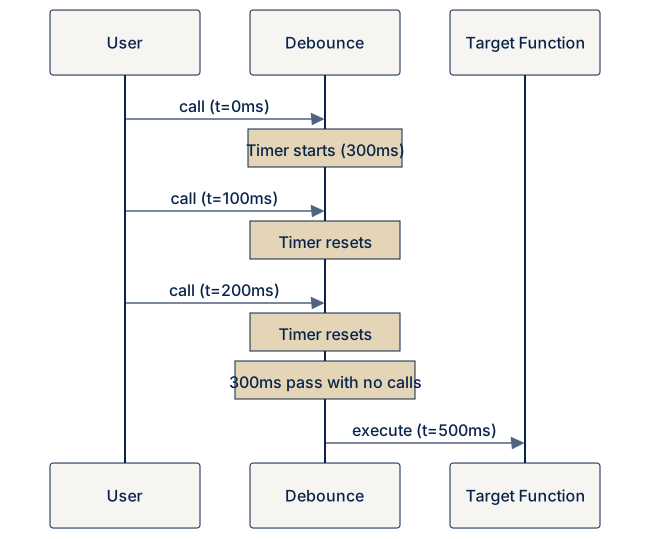
Debounce ensures a function only runs after a specified delay following the last invocation. If the function is called again within the delay period, the timer resets.
The classic use case: a search input that fires an API call only after the user stops typing for 300ms.
function debounce<TArgs extends unknown[]>(
  fn: (...args: TArgs) => void,
  delayMs: number
): {
  (...args: TArgs): void;
  cancel: () => void;
} {
  let timerId: ReturnType<typeof setTimeout> | undefined;

  function debounced(...args: TArgs): void {
    if (timerId !== undefined) {
      clearTimeout(timerId);
    }
    timerId = setTimeout(() => {
      timerId = undefined;
      fn(...args);
    }, delayMs);
  }

  debounced.cancel = function (): void {
    if (timerId !== undefined) {
      clearTimeout(timerId);
      timerId = undefined;
    }
  };

  return debounced;
}

// Usage
const handleSearch = debounce((query: string): void => {
  console.log(`Searching for: ${query}`);
}, 300);

handleSearch("h");
handleSearch("he");
handleSearch("hel");
handleSearch("hell");
handleSearch("hello"); // Only this one executes (after 300ms)
Adding a cancel method is important for cleanup: when a component unmounts, you can cancel the pending timer to avoid calling functions on unmounted state.
Throttle
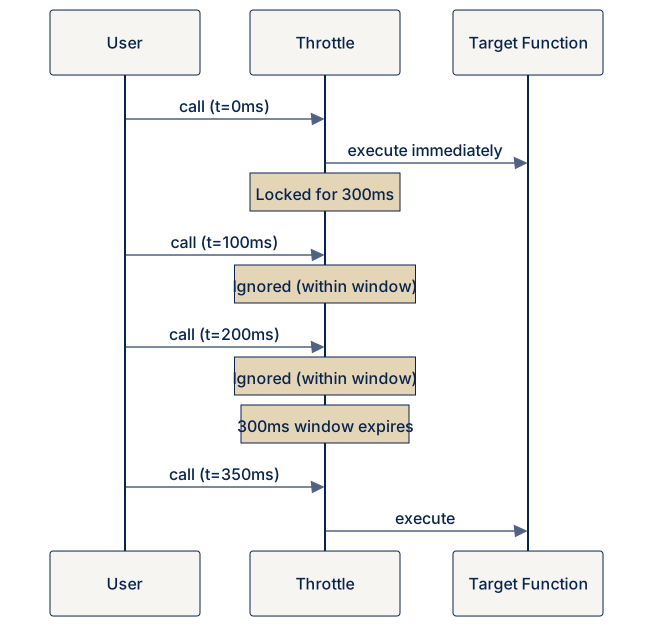
Throttle ensures a function executes at most once per interval, regardless of how many times it is called. Unlike debounce, throttle guarantees execution at a regular rate.
The classic use case: updating UI on a scroll event, but only 10 times per second, not hundreds of times.
function throttle<TArgs extends unknown[]>(
  fn: (...args: TArgs) => void,
  intervalMs: number
): (...args: TArgs) => void {
  let lastCallTime = 0;
  let timerId: ReturnType<typeof setTimeout> | undefined;

  return function (...args: TArgs): void {
    const now = Date.now();
    const timeSinceLastCall = now - lastCallTime;

    if (timeSinceLastCall >= intervalMs) {
      // Enough time has passed: execute immediately
      lastCallTime = now;
      fn(...args);
    } else {
      // Schedule execution for when the interval expires
      if (timerId !== undefined) {
        clearTimeout(timerId);
      }
      timerId = setTimeout(() => {
        lastCallTime = Date.now();
        timerId = undefined;
        fn(...args);
      }, intervalMs - timeSinceLastCall);
    }
  };
}

// Usage
const handleScroll = throttle((scrollY: number): void => {
  console.log(`Scroll position: ${scrollY}`);
}, 300);
This implementation executes on the leading edge (first call) and schedules a trailing call to ensure the final event is never dropped. Some implementations only use leading or only trailing edge: worth clarifying in an interview which behaviour is required.
Debounce vs Throttle: When to Use Which
| Scenario | Pattern | Reason |
|---|---|---|
| Search-as-you-type | Debounce | Wait for the user to pause |
| Window resize handler | Debounce | React to the final size |
| Scroll position tracking | Throttle | Regular updates, not just final |
| Button click (prevent double submit) | Debounce | Only the last matters |
| Rate-limit API calls | Throttle | Maximum N calls per second |
| Mouse move tracking | Throttle | Steady stream of updates |
Key insight: Debounce, throttle, and memoization are all closures over state: a timer ID, a timestamp, or a cache. Once you see them as closure patterns, implementing them from scratch becomes mechanical. The generic TypeScript signatures are the hard part; the logic is straightforward once you know what state to track.