OAuth2 Sequence Diagrams, Demystified
OAuth2 stops being black magic once you draw it. The authorization code flow explained step by step as a sequence diagram, with every token and redirect.
1 May 2024
I used to think OAuth2 was black magic. Tokens flying around, redirects everywhere, servers talking behind the user's back. Then I drew a sequence diagram. Everything clicked.
OAuth2 is an authorization framework. It lets your app access someone's data on another service without ever seeing their password. That's it. The complexity comes from how it does this safely.
The Core Flow in Plain English
There are four players in every OAuth2 flow:
- Resource Owner — the user who owns the data
- Client Application — your app, which wants access
- Authorization Server — the gatekeeper that issues tokens (Google, GitHub, etc.)
- Resource Server — where the actual data lives
The dance goes like this:
- Your app asks permission. The client redirects the user to the authorization server. "Hey, this app wants to read your profile. Allow it?"
- The user says yes. They log in on the authorization server's page (not yours). The server generates an authorization code and redirects the user back to your app.
- Your app exchanges the code for a token. This happens server-to-server. The authorization code is short-lived and useless without your client secret. You trade it for an access token.
- Your app uses the token. Every API call to the resource server includes the access token. The server validates it and returns data.
- Token expires, refresh or re-auth. Access tokens are short-lived on purpose. Use a refresh token to get a new one without bothering the user again.
The key insight: the user's password never touches your application. The authorization code is a one-time intermediary. The access token is the real credential, and it has a limited scope and lifetime.
A Concrete Sequence Diagram
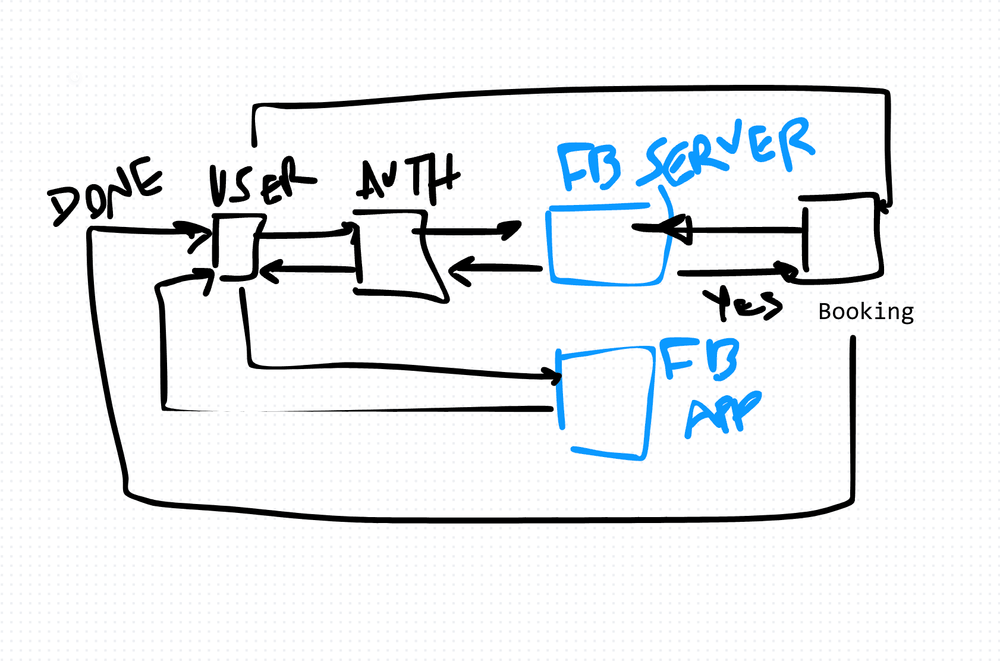
Here's a real-world flow I've implemented. A booking service that authenticates through an OAuth provider:
@startuml
User -> AuthMicroService: Authentication Request
AuthMicroService -> OauthServer: Authentication Request
OauthServer -> AuthMicroService: Success (Redirect + Payload)
AuthMicroService -> User: Success
User -> OauthApp: Redirected (User logins here)
OauthApp -> User: User will be redirected back + authorization code
User -> BookingMicroService: let me book a service + authorization code
BookingMicroService -> OauthServer: is this authorization code valid?
OauthServer -> BookingMicroService: Yes! please
BookingMicroService -> User: your booking is DONE, thanks
@enduml
Notice the separation. The user authenticates on the OAuth server's domain, not on ours. The booking service never sees credentials — it just validates the code.
Why Sequence Diagrams Matter Here
OAuth2 involves multiple hops between multiple services. Without a visual, you'll lose track of who's talking to whom.
I draw sequence diagrams for every OAuth2 integration I build. They expose assumptions early. "Wait — does the client send the code directly to the resource server, or does it go through our backend first?" That kind of question surfaces immediately when you diagram the flow.
They're also invaluable for code reviews and onboarding. A new developer can read a sequence diagram in minutes and understand what would take an hour of reading code.
The Trade-Offs
OAuth2 gives you security and delegation. You never handle user credentials. You get scoped, time-limited access.
But it adds complexity. Multiple redirects. Token management. Refresh logic. CORS issues with browser-based flows. And debugging OAuth2 failures is painful — error messages are often vague by design (to avoid leaking information to attackers).
For simple internal services where you control both sides, OAuth2 might be overkill. A shared API key or mutual TLS could be simpler. But for third-party integrations or any user-facing auth, OAuth2 is the standard for good reason.
Draw the diagram first. The code will follow naturally.
AI Transformation for Organisational Leaders
For directors, heads of function and founders: eight live evening sessions with Ehsan Gazar and Anoosh Zeighami, ending with a one-page 2027 AI plan for your organisation, built on a real workflow and ready for your leadership team.
$1,495, or $1,045 with code EARLYBIRD until 23 Oct.
View the live cohortKeep reading
- When Your Data Is Really a Graph: Write the Recursive Query First
- Everything Is Being Rewritten in Rust. Is It Time You Learned It?
- The Capacity Estimation Numbers Every Engineer Should Carry Into a System Design
- Notes From My First Cohort: System Design Is Trade-offs, Not Answers
- Write HLDs and ADRs in HTML or React, Not Markdown
- CRDTs: Conflict-Free Merging in Distributed Systems