Proxy Design Pattern
I had a database service that every part of the application could call directly. No access control, no logging, no caching. Any component could query anyt...
23 Mar 2024
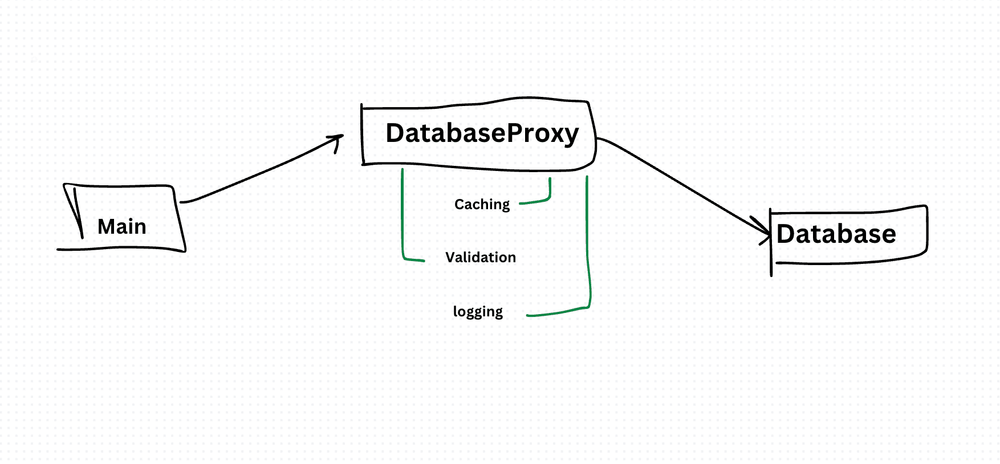
I had a database service that every part of the application could call directly. No access control, no logging, no caching. Any component could query anything. When we got hacked through an unvalidated query, I learned the hard way: you need a gatekeeper.
The Proxy pattern puts a stand-in object in front of the real object. The proxy has the same interface. Clients don't know they're talking to a proxy. But the proxy can add access control, caching, logging, lazy initialization, or any other cross-cutting behavior before (or instead of) calling the real object.
Think of it like a security guard at a building entrance. You don't interact with the building directly — you go through the guard. The guard checks your badge, logs your entry, and then lets you in (or doesn't).
class Database {
  constructor() {
    this.data = { users: ["Alice", "Bob"], secrets: ["classified"] };
  }

  fetchData(table) {
    console.log(`Fetching from ${table}...`);
    return this.data[table];
  }
}

class DatabaseProxy {
  constructor() {
    this.database = new Database();
    this.cache = {};
  }

  fetchData(table, user) {
    if (user !== "admin") {
      console.log(`Access denied for user: ${user}`);
      return null;
    }

    if (this.cache[table]) {
      console.log(`Returning cached data for ${table}`);
      return this.cache[table];
    }

    const data = this.database.fetchData(table);
    this.cache[table] = data;
    return data;
  }
}

const db = new DatabaseProxy();
console.log(db.fetchData("users", "admin"));    // Fetches and caches
console.log(db.fetchData("users", "admin"));    // Returns cached
console.log(db.fetchData("secrets", "guest"));  // Access denied
This proxy does three things: access control, caching, and logging. The client code calls fetchData() the same way it would on the real Database. It doesn't know about the proxy's existence.
Common Proxy Types
- Protection Proxy — Controls access based on permissions (shown above).
- Caching Proxy — Stores results of expensive operations and returns cached values.
- Virtual Proxy — Delays creation of expensive objects until they're actually needed (lazy initialization).
- Logging Proxy — Records method calls for debugging or auditing.
JavaScript's Built-in Proxy
JavaScript has a native Proxy object that intercepts fundamental operations (property access, assignment, function calls):
const handler = {
  get(target, prop) {
    console.log(`Accessing property: ${prop}`);
    return target[prop];
  },
  set(target, prop, value) {
    console.log(`Setting ${prop} to ${value}`);
    target[prop] = value;
    return true;
  }
};

const user = new Proxy({ name: "Alice" }, handler);
user.name;           // logs: Accessing property: name
user.age = 30;       // logs: Setting age to 30
This is how libraries like Vue.js implement reactivity and how some ORMs implement lazy loading.
The benefit: You add behavior without touching the real object. Access control, caching, and logging are cleanly separated from core logic. Clients don't need to change.
The cost: Another layer of indirection. Debugging through proxies can be confusing — especially JavaScript's Proxy object, where behavior is invisible in the source code. Performance overhead from the proxy layer, though usually negligible. And if overused, proxies hide too much — developers don't realize their calls are being intercepted.
I use proxies for access control layers, caching wrappers, and API clients that need retry/logging logic. If you're just adding one simple behavior, a wrapper function is often clearer than a full proxy.
AI Transformation for Organisational Leaders
For directors, heads of function and founders: eight live evening sessions with Ehsan Gazar and Anoosh Zeighami, ending with a one-page 2027 AI plan for your organisation, built on a real workflow and ready for your leadership team.
$1,495, or $1,045 with code EARLYBIRD until 23 Oct.
View the live cohortKeep reading
- Event Sourcing Checklist: When It Makes Sense & Common Pitfalls
- Error Boundary React Design Pattern
- Context API React Design Pattern
- Higher-Order Component (HOC) React Design Pattern
- Container Component React Design Pattern
- Best Practices for Structuring Express.js Applications with Prisma Design Pattern