MCP: Context Is Everything — Notes from a Building with MCP Event
14 May 2026

I attended a Building with MCP event last night. The first talk was by Carly Richmond, Developer Advocate Lead at Elastic: "MCP: Context is Everything." She pitched it at a beginner level — clear, accessible, and grounded in real examples. It reframed something I had been thinking about loosely and gave it a precise structure.
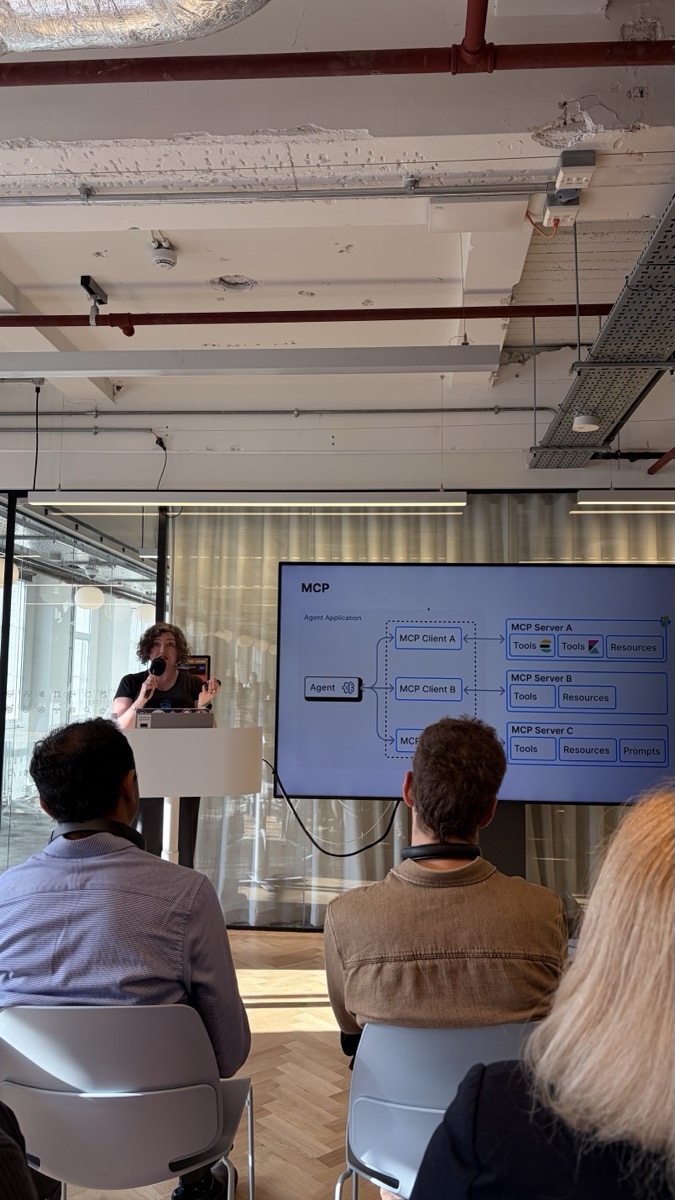
Here is what I took away.
What Is MCP?
MCP stands for Model Context Protocol. Before diving into what it does, let us take a step back and ask a simpler question: why do we need it at all?
When you use an AI assistant like ChatGPT or Claude, you are essentially having a conversation with a language model. The model is very good at reasoning and generating text, but it only knows what you put in the prompt. It does not know what is happening in your company's database right now. It does not know what errors appeared in your logs five minutes ago. It cannot look up live information unless something connects it to those systems.
For a long time, developers had to write custom code for every integration. Want the AI to query your database? Write a database connector. Want it to read from Slack? Write a Slack integration. Every tool was different, every integration was bespoke.
MCP is the solution to that problem. It is an open standard, created by Anthropic, that defines one consistent way for AI agents to connect to external systems. Think of it like USB-C. Before USB-C, every device used a different cable. After USB-C, the connector is the same everywhere, even if the devices are different. MCP is USB-C for AI agents.
How Does It Work?
Here is the basic picture:
Your AI Agent (e.g. Claude, GPT-4)
  ├── MCP Client  ──▶  MCP Server A  (your database)
  ├── MCP Client  ──▶  MCP Server B  (your logs platform)
  └── MCP Client  ──▶  MCP Server C  (your code repository)
The AI agent talks to one or more MCP Clients. Each client connects to an MCP Server. The server is the bridge between the agent and a real system.
Every MCP Server exposes three types of things:
- Tools — actions the agent can take. Examples: run a database query, send an API request, create a support ticket, restart a service.
- Resources — information the agent can read. Examples: log files, documents, database records, metrics dashboards.
- Prompts — pre-written instructions or templates the server provides for common tasks.
The key insight: before MCP, there was no agreed way to separate "reading data" from "taking action." MCP makes that distinction explicit and standard. This matters because you often want the agent to be able to read freely but take action only under strict conditions.
Why Does Context Matter So Much?
The title of Carly's talk was not accidental.
The biggest bottleneck in any AI application is not the model. The models available today (Claude, GPT-4, Gemini) are already very capable. The bottleneck is context: what does the model actually know when it is trying to answer your question?
Here is a simple example. You ask an AI: "Why is our checkout page slow?" The model might give you a generic answer about caching or database queries. But if the model could actually read your logs and your traces right now, it could tell you: "The N+1 query introduced in commit abc123 three hours ago is causing 800ms added latency per request."
Same question. Very different answer. The difference is context.
What About RAG?
You may have heard of RAG, which stands for Retrieval-Augmented Generation. RAG was the first widely adopted technique for giving AI models better context. The idea is: take your documents, break them into chunks, store them in a searchable index, and at query time, retrieve the most relevant chunks and include them in the prompt.
RAG works well for static knowledge (documentation, articles, past conversations). But it does not work for live systems. You cannot pre-index your production logs because they are being written continuously. You cannot pre-index your live database because the data changes by the minute.
MCP solves the live context problem. Instead of pre-indexing data, the agent connects to the live system directly via an MCP Server and asks for what it needs in the moment.
A Real Example: Finding a Bug in Production
Carly works at Elastic, an observability and search company. The example she walked through made the whole thing click.
Imagine an on-call engineer is paged at 2am. The checkout service is slow. Instead of spending an hour digging through dashboards, they open their AI assistant and ask: "Why is the checkout service slow right now?"
Behind the scenes, the agent:
- Connects to the Elasticsearch MCP Server and pulls the last 15 minutes of traces for the checkout service
- Reads through the slow spans and spots that a specific database query accounts for 80% of the latency
- Connects to the GitHub MCP Server and checks recent commits to the affected service
- Returns an answer: "The N+1 query introduced in commit abc123 three hours ago is causing 800ms added latency per checkout request."
No pre-built index. No hand-crafted query. The agent used standard MCP connections to pull live data from live systems and reason over it.
This is what changes when you have MCP. AI goes from a smart text generator to an assistant that can actually investigate your production system.
What This Means If You Are Getting Started
You do not need to rewrite your whole architecture to take advantage of MCP. Here are a few practical starting points:
Start with read-only MCP Servers. Give your AI agent access to your logs, your documentation, or your metrics. Read-only access is low risk and immediately useful.
Think of MCP Servers as APIs for AI agents. If you have already built REST APIs for your services, you already understand the concept. An MCP Server is the same idea, but designed for an AI consumer rather than a human-built client.
Be deliberate about what actions you expose. Tools (actions the agent can take) need more care than Resources (data the agent can read). Start with read access, add write actions gradually, and always log every tool call the agent makes.
Security is per-server. Each MCP Server has its own permissions. The agent can only do what the server allows. Design each server with the minimum permissions needed for the job.
The Bigger Picture
Carly ended with an idea that stuck with me. We are used to thinking about AI as: "give the model a task and some tools and let it go." MCP inverts that framing. The question becomes: "how do I make my systems readable by AI agents?"
Your logs, your APIs, your database, your code: each of these can become an MCP Server that any agent can query through a standard interface. You build it once and any AI can connect to it.
It is the same shift that happened when REST APIs replaced bespoke integrations. REST did not change what systems did. It standardised how they communicated. MCP does the same for AI.
The agents that will be most capable in two years will not be the ones with the smartest model. They will be the ones with the richest context, pulled in real time from the most sources. Context is the moat.
If you are building with MCP or just getting started with AI integrations, I write about this in Notes from Gazar: practical notes on system design and AI architecture, sent when there is something worth sending. Or connect with me on LinkedIn where I share shorter takes between issues.
AI Transformation for Organisational Leaders
For directors, heads of function and founders: eight live evening sessions with Ehsan Gazar and Anoosh Zeighami, ending with a one-page 2027 AI plan for your organisation, built on a real workflow and ready for your leadership team.
$1,495, or $1,045 with code EARLYBIRD until 23 Oct.
View the live cohortKeep reading
- Agentic Systems in Production: Agent Interfaces, Orchestration Patterns, and Observability
- Supervisor Agent Architecture: What Makes It Work
- Multi-Agent Topologies: Choosing Between Supervisor, Pipeline, and Broadcast
- From Prompts to Persistence: Agent Memory, Context, and Memory Engineering
- Chunking Is Product Design (And Most RAG Systems Prove It)
- Token Economics: How to Cut LLM Cost Without Making Your Product Worse