Machine Learning Amazon SageMaker
Machine learning has a three-step lifecycle: prepare data, train a model, deploy it. Most tutorials focus on the first two. The third is where teams get s...
14 Oct 2023

Machine learning has a three-step lifecycle: prepare data, train a model, deploy it. Most tutorials focus on the first two. The third is where teams get stuck.
AWS SageMaker exists to solve that third step -- and increasingly, all three.
What SageMaker actually does
SageMaker is a managed service that handles the infrastructure side of machine learning. You bring the data and the model. SageMaker gives you the compute, the training environment, and the deployment pipeline.
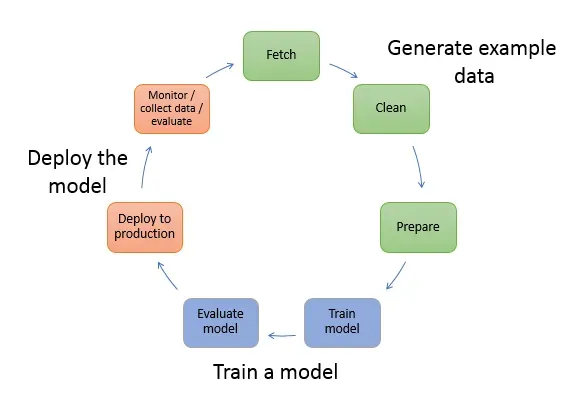
The three steps
Step 1: Data preparation. Data comes from databases, logs, APIs, CSVs -- everywhere. Before you can train anything, you need to clean it, filter it, and structure it into a format your model expects. SageMaker provides notebooks and processing jobs for this.
Step 2: Model training. Most of the time, you're using an existing algorithm (not inventing one). You feed it structured data and let it learn patterns. SageMaker spins up training instances, runs the job, and saves the trained model. You pick the algorithm and the hyperparameters. SageMaker handles the compute.
Step 3: Deployment. This is where SageMaker shines. You take your trained model and deploy it as an endpoint that your application can call. SageMaker manages scaling, monitoring, and versioning.
The trade-offs
The benefit: You don't manage servers, GPUs, or training infrastructure. SageMaker handles provisioning, scaling, and teardown. For teams that don't want to build ML infrastructure from scratch, it removes a massive operational burden.
The cost: Vendor lock-in. SageMaker is deeply tied to the AWS ecosystem. Pricing can surprise you -- training jobs and endpoints bill by the minute, and GPU instances are expensive. If your workload is small or experimental, the overhead of SageMaker might not be worth it.
When it makes sense: Teams with production ML workloads that need reliable deployment and scaling. If you're prototyping, a local setup or a simpler tool might be faster.
When it doesn't: One-off experiments, small datasets, or teams already comfortable managing their own infrastructure.
AI Transformation for Organisational Leaders
For directors, heads of function and founders: eight live evening sessions with Ehsan Gazar and Anoosh Zeighami, ending with a one-page 2027 AI plan for your organisation, built on a real workflow and ready for your leadership team.
$1,495, or $1,045 with code EARLYBIRD until 23 Oct.
View the live cohortKeep reading
- LLM Tracing vs Evals: Which One Tells You Why Your Agent Broke
- Containers vs Cloudflare Computer: There Is Not Enough Compute for One Box Per Agent
- Graph Engineering: Every Edge You Draw Takes a Decision Away From the Model
- Semantic Caching for AI Requests, Explained Simply
- The Most Honest Piece of Documentation Hugging Face Ships Is Its Logo
- Why I Route Every AI Call Through OpenRouter Instead of Direct Endpoints