How would you design an expense app?
At Tipalti, I worked on payment and expense systems. The hardest part wasn't processing the expense itself. It was the approval workflow. Every organizati...
2 May 2024
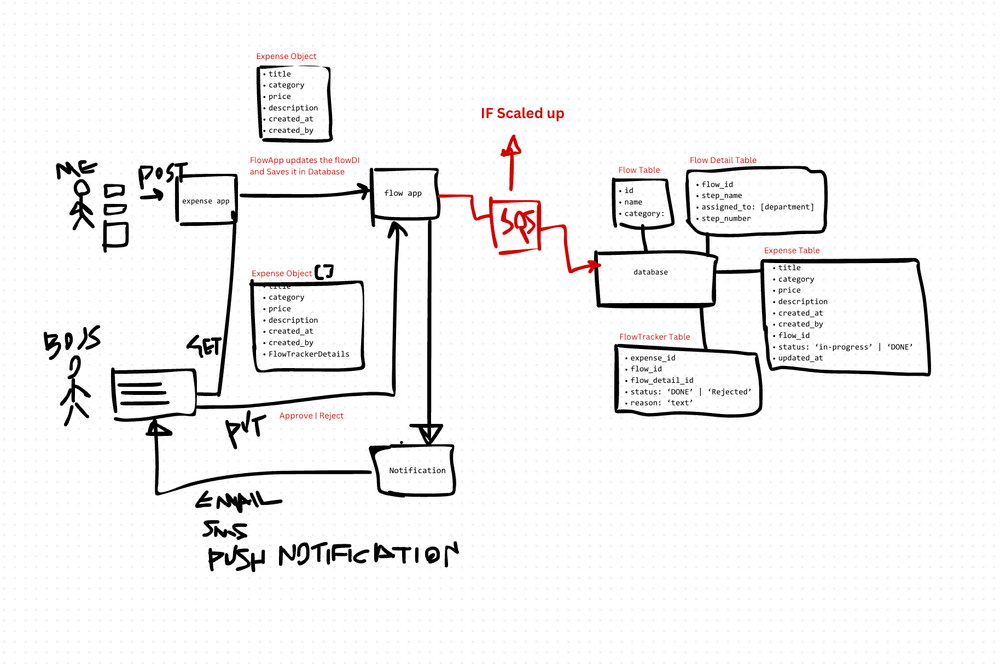
At Tipalti, I worked on payment and expense systems. The hardest part wasn't processing the expense itself. It was the approval workflow. Every organization has a different hierarchy. Some have two levels of approval. Some have five. Some route by department. Some route by amount. And they all want to customize it.
An expense app is really a workflow engine with a finance UI on top.
The Core Problem
Users submit expenses. Those expenses need to be reviewed and approved before payment. But "reviewed and approved" means different things in different organizations:
- An employee submits a $50 lunch receipt → their direct manager approves it.
- An employee submits a $5,000 conference trip → their manager approves, then the department head approves, then finance reviews it.
- A VP submits any expense → only the CFO approves it.
The system must support configurable, multi-step approval workflows that vary by user level, expense amount, department, and expense category.
Data Model
The key insight is separating the flow definition from the flow execution:
- Flow — a reusable approval workflow template. Defines the steps, the roles required at each step, and the conditions that trigger it (amount thresholds, departments, expense categories).
- FlowDetails — the individual steps within a flow. Step 1: manager approval. Step 2: department head approval. Step 3: finance review. Each step has a role, an action (approve/reject/escalate), and optional conditions.
- FlowTracker — tracks where a specific expense is in its assigned flow. Which step is it on? Who approved it? When? What's the current status?
- Expense — the actual expense record. Amount, category, description, receipt attachments, submitter, timestamps.
Each expense gets matched to a flow (flow detection) based on its attributes. Then the FlowTracker manages the progression through each approval step.
How Flow Detection Works
When a user submits an expense, the system evaluates rules to determine which flow applies:
- Check the user's role/level in the organization hierarchy.
- Check the expense amount against threshold rules.
- Check the expense category (travel, meals, equipment, software).
- Match to the most specific flow that fits.
This is essentially a rules engine. Keep the rules in a configuration store, not hardcoded. Organizations change their approval policies frequently, and you don't want to deploy code for every policy change.
The Approval Pipeline
Once a flow is assigned:
- The expense appears in the first approver's queue.
- The approver reviews the expense — sees the receipt, amount, category, and submitter details.
- They approve, reject, or request more information.
- On approval, the FlowTracker advances to the next step and notifies the next approver.
- On rejection, the submitter is notified and can revise and resubmit.
- When all steps are complete, the expense is marked as approved and queued for payment.
Technical Considerations
Notifications. Every state change triggers a notification. Email, push, and in-app. Approvers need to know when something is waiting for them. Submitters need to know when something is approved or rejected.
Audit trail. Every action is logged: who approved/rejected, when, with what comment. This is non-negotiable for financial systems. Regulators and auditors will ask for it.
Delegation. What happens when an approver is on vacation? Support delegation — the ability to assign approval authority to another person temporarily.
Bulk operations. Managers with 50 pending approvals don't want to click through each one individually. Support bulk approve/reject with optional spot-checking.
The Trade-Offs
Configurable workflows vs. simplicity. A fully configurable rules engine handles any approval policy. But it's complex to build, complex to configure, and complex to debug when an expense routes to the wrong person. For many small companies, a simple two-level approval (manager → finance) is sufficient.
Real-time notifications vs. digest. Notifying on every expense submission creates noise. A daily digest is quieter but delays approvals. I'd default to real-time for the first approver in the chain and digest for subsequent approvers.
OCR receipt scanning vs. manual entry. OCR (using services like Google Vision or AWS Textract) can auto-populate expense details from receipt photos. It's convenient but not 100% accurate. Always let users correct auto-populated fields.
The best expense apps feel simple to the submitter and powerful to the administrator. That's the design tension: hide the workflow complexity from the user while giving full control to the people configuring the system.
AI Transformation for Organisational Leaders
For directors, heads of function and founders: eight live evening sessions with Ehsan Gazar and Anoosh Zeighami, ending with a one-page 2027 AI plan for your organisation, built on a real workflow and ready for your leadership team.
$1,495, or $1,045 with code EARLYBIRD until 23 Oct.
View the live cohortKeep reading
- When Your Data Is Really a Graph: Write the Recursive Query First
- Everything Is Being Rewritten in Rust. Is It Time You Learned It?
- The Capacity Estimation Numbers Every Engineer Should Carry Into a System Design
- Notes From My First Cohort: System Design Is Trade-offs, Not Answers
- Write HLDs and ADRs in HTML or React, Not Markdown
- CRDTs: Conflict-Free Merging in Distributed Systems